
Container & Kubernetes
Generate and analyze SBOMs for container images and Kubernetes clusters.
Container images bundle application code with dependencies and system libraries. Knowing what's inside helps you catch vulnerabilities before they reach production.
This guide shows how to generate SBOMs from Docker containers and Kubernetes clusters, then analyze them for security issues.
Scanning Docker Containers
Observer CLI scans container images directly and generates CycloneDX SBOMs. The command works with local images, remote registries, and doesn't require Docker to be running.
Scan the container image
observer image -o app.cdx.json nginx:latestThis generates an SBOM analyzing OS packages and application dependencies in the container.
Upload to SBOM Observer
observer upload app.cdx.jsonOr use the web interface: navigate to Attestations → Upload Attestation and select the SBOM file.
Scanning from remote registries
Observer CLI works with any registry:
observer image -o app.cdx.json docker.io/library/nginx:latest
observer image -o app.cdx.json ghcr.io/myorg/myapp:v1.2.3
See the CLI reference for authentication and advanced options.
Using other SCA tools
You can also use Observer CLI, Trivy, Syft, or any tool that produces CycloneDX or SPDX SBOMs:
docker run -v ./output:/output aquasec/trivy image \
  -q --scanners vuln \
  --format cyclonedx \
  --output /output/result.cdx \
  nginx:latest

observer upload output/result.cdx
Kubernetes Cluster Analysis
For Kubernetes environments, Observer CLI creates cluster snapshots that include SBOMs for all running workloads.
Experimental feature
The k8s command is currently in development and may change. It requires cluster-admin permissions and can take several minutes on large clusters.
Pre-requisites
- A running Kubernetes cluster with
kubectlconfigured to access it. observer CLIinstalled and authenticated with your SBOM Observer API token.- A container SBOM scanner: Trivy (default) or Syft installed locally for image scanning.
Create a snapshot and SBOMs
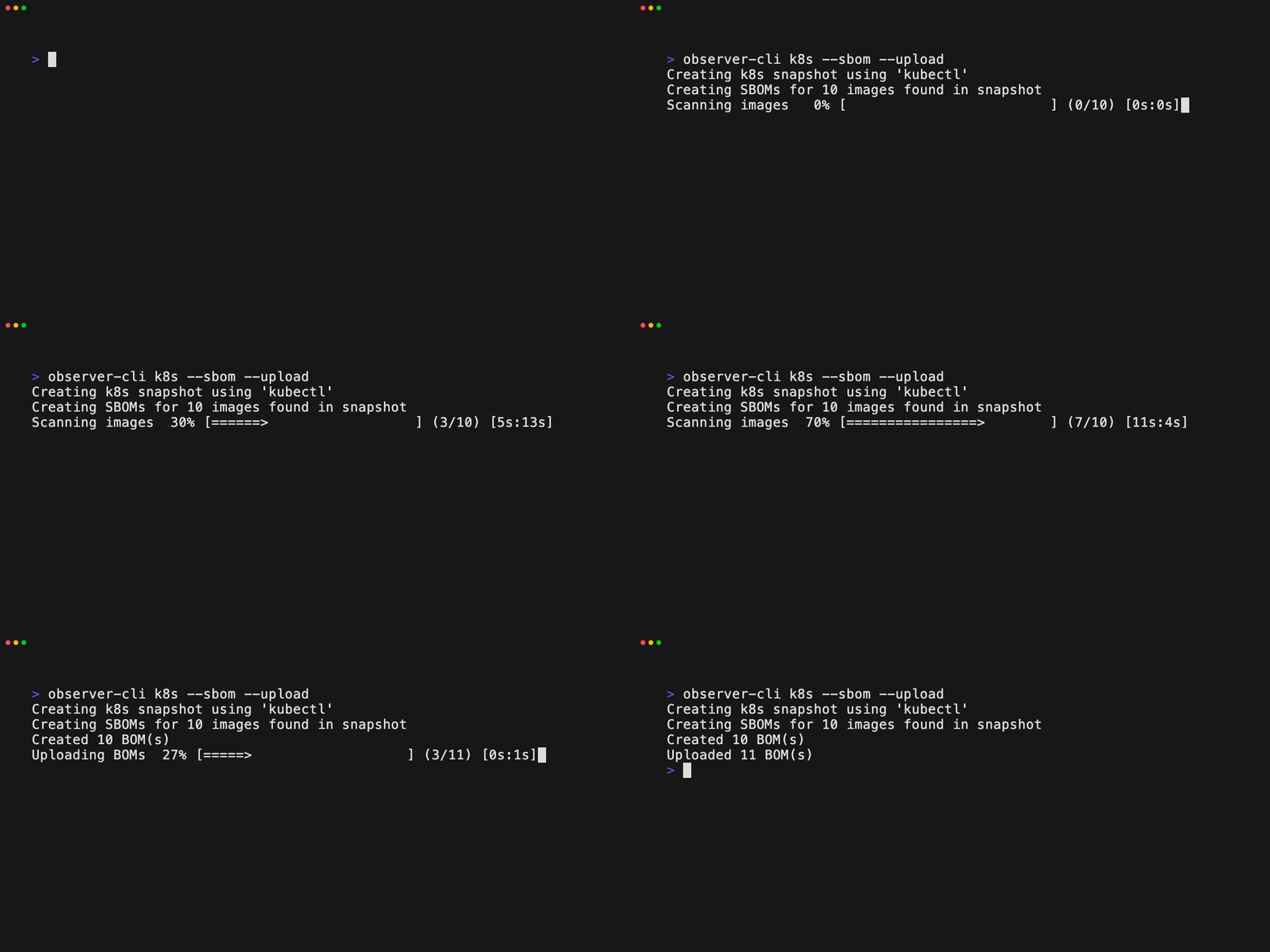
observer k8s --sbom --uploadThis command:
- Uses your current kubeconfig context.
- Snapshots all namespaces (including control-plane components in
kube-system). - Generates SBOMs for every discovered image.
- Uploads the snapshot and SBOMs to SBOM Observer.
For scope controls (namespaces, scanner choice, output directory), see the CLI reference.
Video Walkthrough
Watch this step-by-step guide showing how to scan a Docker container, generate an SBOM, and analyze it for vulnerabilities:
What You'll See
Once uploaded, SBOM Observer shows:
- Component inventory - All packages, libraries, and OS components
- Layer-by-layer breakdown - Which dependencies were added in each Docker layer
- Vulnerabilities - CVEs affecting components with severity and EPSS scores
- Policy violations - Any compliance or security rules that failed
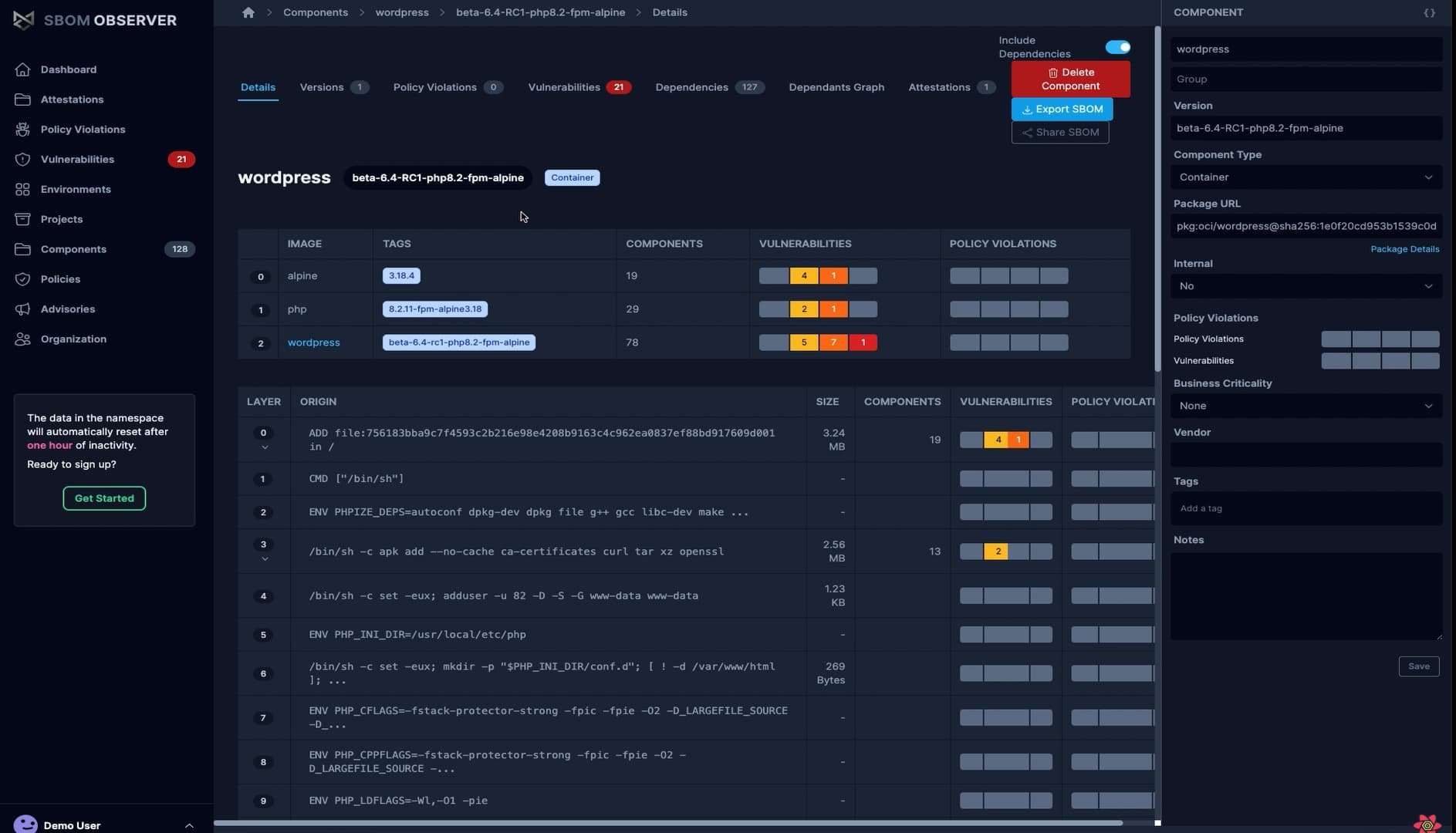
This layer view helps you identify which build steps introduced vulnerable dependencies, making it easier to fix issues at the source.
Why Container SBOMs Matter
Container images often include hundreds of packages you didn't explicitly install - base images, system libraries, transitive dependencies. Without an SBOM, you can't know:
- What's actually running in production
- Which vulnerabilities affect your containers
- How to comply with security requirements
- When upstream dependencies need updates
Regular container scanning catches issues before deployment. Upload SBOMs to SBOM Observer for continuous monitoring as new vulnerabilities are disclosed.
Next Steps
- Upload SBOMs from CI/CD pipelines
- Enforce policies to block vulnerable containers
- Analyze impact when vulnerabilities are found
- Share SBOMs with customers or security teams