
Impact Analysis
Trace which applications and components are affected by a vulnerability using the live demo.
Use the live demo to see how SBOM Observer identifies impacted software when a vulnerability is found. In a few clicks, you'll inspect CVE-2022-1471 (SnakeYAML) and view every component and project that inherits the issue.
Before you begin
- The demo runs in an isolated workspace that resets automatically after 1 hour of inactivity.
- All required SBOM data is preloaded so you can focus on analyzing impact, not modeling data.
Walkthrough
Start the sandbox
Go to demo.sbom.observer and click Open Live Demo. This launches a fresh namespace with representative SBOMs, policies, and sample findings.
Open Vulnerabilities
In the left sidebar, select Vulnerabilities. This view lists every CVE found in the imported SBOMs, with severity, affected ecosystems, and policy violations.
Use the keyboard shortcut in the top-right ⌘K / Ctrl+K to jump via the search.
Find CVE-2022-1471
Use the Quick search on the page (or press /) and type CVE-2022-1471. Press Enter to find the vulnerability.
The table shows:
- Package:
org.yaml:snakeyamlversion1.33 - Severity:
Critical 9.8with exploit insights - Link to analyze impact and view affected components.
Run impact analysis
Click Analyze in the search result table and SBOM Observer expands an Impact table listing every directly affected component.
Review the columns:
- Component shows affected artifacts (for SnakeYAML you'll see
dependencytrack/bundledandquay.io/keycloak/keycloak). - Version, Type, and Ecosystem indicate how the component is distributed.
- Internal flags whether the component is owned or external.
- Vulnerabilities and Policy Violations summarize issues to help prioritize remediation.
Visualize relationships
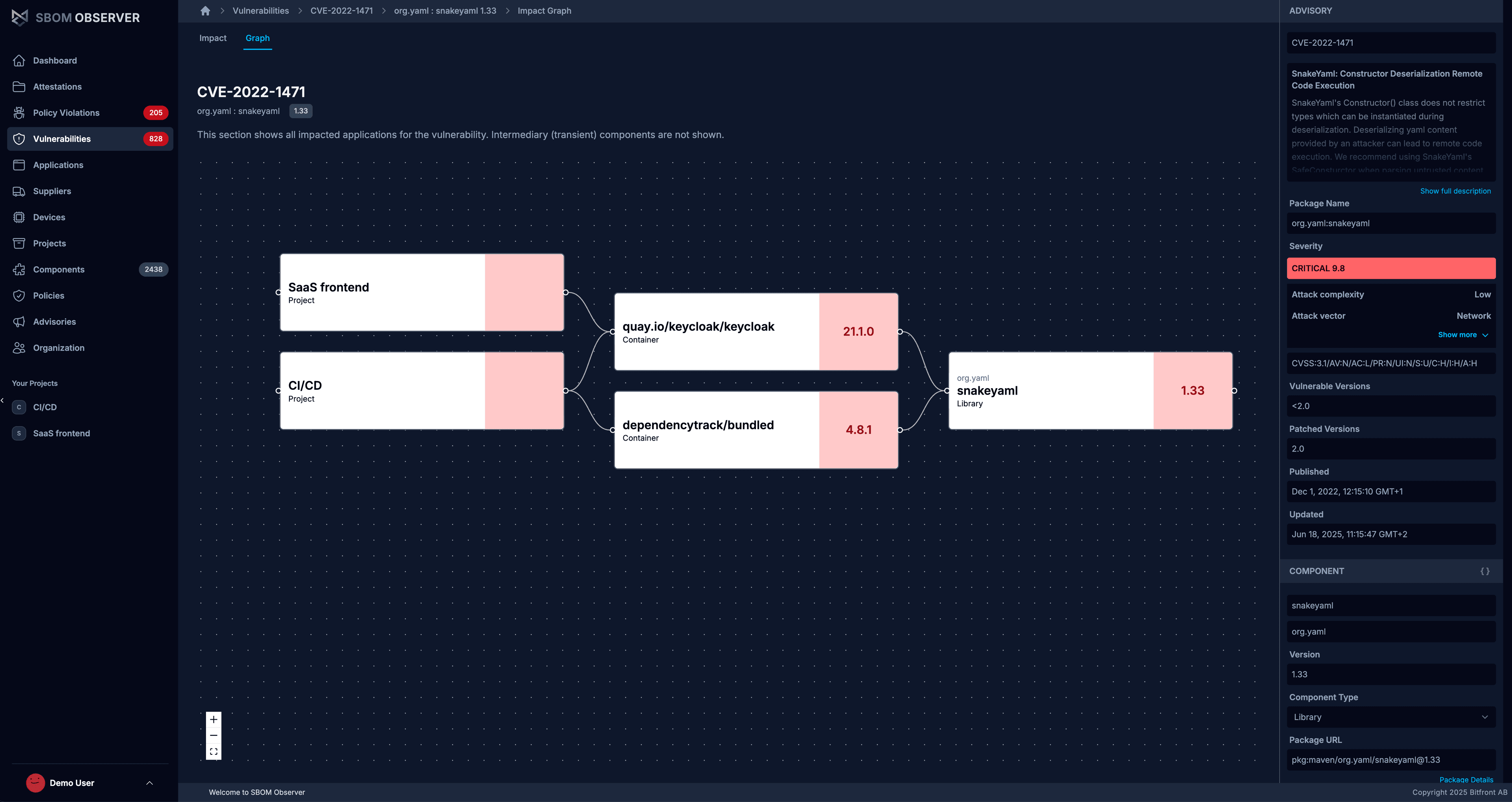
Open the Graph tab to see how everything connects. Projects like SaaS frontend and CI/CD appear on the left, flowing into their container images, which depend on SnakeYAML.
Use this view to check who's affected and confirm that a fix (like upgrading Keycloak) removes downstream risk. It also shows VEX status, whether you added it manually or imported a VEX document attestation, so you can include affected/not affected statements in your decisions.
Next steps
- Continue with the Policies tutorial to automate response playbooks.
- Explore the CI/CD integration guide to catch high-risk packages during builds.
- Learn more in What is SBOM Observer?.